

Rebex Drive: Connect SFTP, FTP, and WebDAV storage as a Windows drive
Rebex Drive public preview is here
We have just released Rebex Drive - a free app that allows you to mount SFTP, FTP and WebDAV storage as a network drive.
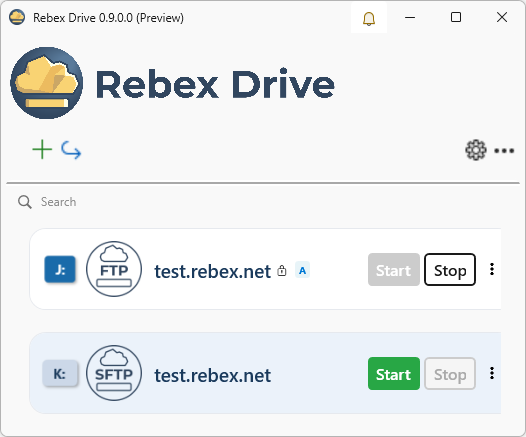

Connect remote SFTP, FTP, or WebDAV storage and use it like a normal Windows drive
Working with files on a remote server is often more cumbersome than it should be.
You have data on an SFTP, FTP, FTP/SSL, or WebDAV server. You need to edit it, copy it, organize it, or open it in your usual tools. One option is to use a dedicated file transfer client, such as WinSCP, download the files locally, work with them, and upload them back when you are done.
That works. But it is not always convenient.
Rebex Drive takes a different approach. It lets you mount remote storage as a Windows drive, so you can work with remote files almost as if they were on a normal network disk.
Once mounted, the remote storage is available to regular Windows applications:
- Windows Explorer
- Microsoft Office
- Photo managers
- Development tools
- Anything else that works with files on a Windows drive
No special integration is needed in those applications. They just see a drive.
What's included in the first preview
We have released the first public preview of Rebex Drive.
This preview version is completely free.
It currently supports:
- SFTP
- FTP and FTP/SSL
- WebDAV
- mapping any number of remote drives
(well, at least until you run out of free drive letters)
The goal is simple: connect remote storage and use it from Windows like a normal drive.
Try it and tell us what you think
Rebex Drive is still in preview, so feedback matters. Want to add another protocol? A specific feature? Let us know.
If you try it, we would like to hear what worked, what did not, and what would make it more useful for your workflow.
Comments, bug reports, and feature suggestions are welcome at: support@rebex.net.